
⚡ Radio Frequency (RF) signals are electromagnetic waves used to transmit information wirelessly, including by devices such as hidden cameras, GPS trackers, bugs, and wireless microphones.

🏷️ RF Detector Deals ⭐⭐⭐⭐
Finding these signals is essential for finding covert surveillance equipment or diagnosing interference issues in wireless networks.
In this article, we explore how to detect RF signals, tools you can use, and practical steps to ensure your privacy.
Table of Contents
What Are RF Signals?
RF signals are electromagnetic waves typically ranging from 3 kHz to 300 GHz. They are used in many technologies, including:
- Wi-Fi routers
- Bluetooth devices
- Mobile phones
- GPS trackers
- Wireless surveillance cameras
- Radio and TV broadcasting
Detecting RF signals can help identify hidden wireless devices transmitting information without your knowledge or troubleshoot issues with network performance caused by interference.

🛜 DD1206 : Your First Line of Defense in RF Detection
When and Why Would You Need to Detect RF Signals?
- Privacy concerns: Find hidden surveillance devices like cameras or microphones
- Vehicle tracking: Identify GPS trackers placed on cars
- Wireless network troubleshooting: Locate the source of interference affecting Wi-Fi or Bluetooth connections
- Security audits: Monitor unauthorized devices in restricted areas
Tools for Detecting RF Signals
RF Detectors
Handheld devices that scan for active RF transmissions and alert you when a signal is detected.
🏆 Best Overall: Defcon PROTECT 1206i
A strong choice for users who want a more capable RF bug detector with wide frequency coverage and reliable signal detection.
Check Price on Amazon🥈 Runner Up: Anti Spy Detector
A versatile detector for finding hidden cameras, RF signals, GPS trackers, and other common wireless surveillance devices.
Check Price on Amazon💰 Best Budget Pick: Selowea Hidden Camera Detector
An affordable option for basic bug sweeping, hidden camera detection, RF signal detection, and travel use.
Check Price on Amazon🎒 Compact Pick: Navfalcon RF Detector
A portable detector with multiple modes for checking rooms, offices, hotels, vehicles, and travel spaces.
Check Price on Amazon🔎 Notable Contender: Bug Hunter Expert BH-03
A more advanced RF detector with strong sensitivity, signal location features, and professional-style bug sweeping capability.
Check Price on AmazonSpectrum Analyzers
Advanced devices that display the frequency, strength, and type of RF signals.

📡 Recommended Tools
If you want to follow this guide in practice, these are the tools we recommend based on budget and use case.
Best low-cost option for beginners who want a standalone spectrum analyzer for basic RF signal hunting.
Check Price
Best for learners who want an affordable SDR setup with waterfall displays and PC-based analysis.
Check Price
Best handheld option for field checks, quick sweeps, and portable RF troubleshooting.
Check Price
Best for serious RF work where accuracy, dynamic range, and bench-grade performance matter.
Check Price
Quick pick: Start with the TinySA Ultra if you want the cheapest standalone tool, choose the RTL-SDR Blog V4 if you prefer PC-based analysis, and step up to the Siglent SSA3021X Plus for professional RF work.

Mobile Apps
Some smartphone apps (like WiFi Analyzer or RF Signal Tracker) detect Wi-Fi and Bluetooth signals, though their range is limited compared to professional tools.
Multi-function RF/Bug Detectors
These devices combine RF detection with lens detection to find hidden cameras or microphones.

Multi function RF Detector ⭐⭐⭐⭐⭐
Recommended Products
- KORKUAN RF Detector: Detects wireless bugs and hidden cameras
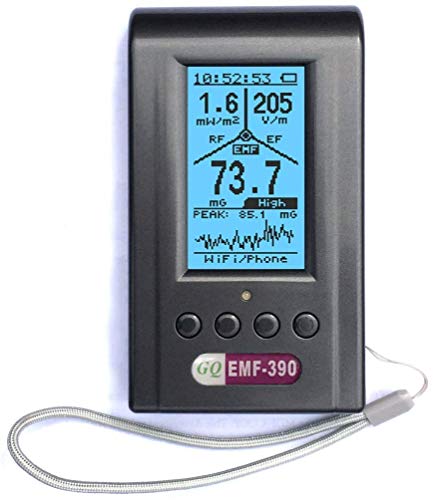
- GQ EMF-390: A compact EMF detector for detecting a wide range of RF signals
How to Detect RF Signals: Step-by-Step Process
Step 1: Prepare the Area for Scanning
- Turn off all known wireless devices in the area, such as routers, Bluetooth speakers, and smart home devices, to avoid false positives.
- Ensure the room is quiet so you can listen for interference noises from bugs or trackers.
Step 2: Use an RF Detector or App
- RF Detector: Turn on the device and sweep it slowly across the room, focusing on outlets, light fixtures, and furniture.
- Mobile App: Perform a scan of available Wi-Fi or Bluetooth networks and look for unknown devices.
Step 3: Monitor Signal Strength
- Many RF detectors show the signal strength as you move closer to the source.
- Use spectrum analyzers to look for spikes in specific frequency bands, such as 2.4 GHz or 5 GHz, which are commonly used by Wi-Fi or hidden cameras.

Step 4: Identify Suspicious Devices
- Intermittent signals might indicate a covert device. Repeated scans can help track it down.
- Move toward the signal’s origin to narrow its location.
Step 5: Scan for Bluetooth Devices
Some bugs use Bluetooth rather than traditional RF frequencies. Use a Bluetooth scanning app (like BLE Scanner) to search for unfamiliar or unpaired devices.
Identifying Common RF Frequency Bands
Understanding which frequency bands are in use helps pinpoint the type of device:
- 2.4 GHz: Used by Wi-Fi, Bluetooth, and some hidden cameras
- 5 GHz: Used by Wi-Fi networks
- 900 MHz: Used by older wireless phones and some GPS trackers
- 433 MHz: Used by remote controls and basic wireless devices
- 1.2 GHz or 2.3 GHz: Used by certain covert surveillance equipment
Advanced Methods for RF Detection
Spectrum Analyzer Monitoring
A spectrum analyzer provides a visual display of RF activity. This tool is particularly useful for identifying exact frequencies and sources.
Tip: Use a spectrum analyzer alongside an RF detector for higher accuracy.
📖 Read our article on the Best Spectrum Analyzers

Direction Finding Equipment
Use a directional antenna to find the source of strong RF signals, which is helpful when searching for GPS trackers or other covert transmitters.
How to Prevent RF Interference or Unauthorized Surveillance
- Shielding: Use RF-blocking materials like aluminum foil or Faraday bags to block wireless signals.
- Jammers: RF jammers disrupt signals but are illegal in many places.
- Device Authentication: Regularly scan your network to ensure no unauthorized devices are connected.
- EMI Filters: Install these to prevent electrical interference in sensitive equipment.
Legal Considerations
Before using RF detection equipment, familiarize yourself with local regulations. Detecting surveillance devices in public spaces or jamming signals may be subject to privacy and communication laws.
Troubleshooting Tips
- False Positives: Other wireless devices or nearby networks may cause signals. Try to control the environment for a more accurate scan.
- Intermittent Signals: Some covert devices only transmit occasionally. Repeat scans over time for better detection.
- Device Calibration: Regularly calibrate RF detectors to ensure accurate readings.
Final Thoughts
Detecting RF signals is a crucial skill for safeguarding privacy, locating surveillance devices, and troubleshooting wireless interference. With the right tools and systematic methods, you can effectively track down RF sources and ensure peace of mind.
When scanning for hidden cameras, GPS trackers, or resolving network issues, practice and vigilance are key. Stay informed, use reliable tools, and act promptly to protect your personal space and information.
💡 Related Posts
- Best RF Detectors
- What is Radio Frequency (RF)?
- How does a hidden camera detector work?
- How does a cell phone detector work?
- Understanding RF Spectrum Analyzers
